|
1. Initial Configuration - Parameters & User Rights
AusFleet Support and Help Desk are unable to change passwords and have no access to them.
1.1 Parameters
More>>Parameters>>Flags and Settings
Email server details must be entered in these parameters:
Ref No.
|
Module
|
Name
|
|
2290
|
Administration
|
Email for password reset*
|
|
2250
|
Administration
|
SMTP username
|
|
2260
|
Administration
|
SMTP password
|
* A "no-reply" email address is recommended.
1.2 User Rights
More>>User Rights
Users do not need user rights to reset their own password but Administrators can reset passwords for other people if this user right is allocated.
Ref No
|
Name
|
|
10.03
|
User Rights - Ability to reset password for other users
|
2. How Do Users Reset Their Own Password?
A username email address must be registered in AusFleet Personnel module before being granted a password.
It is good practice to change your password on a regular basis to maintain security.
|
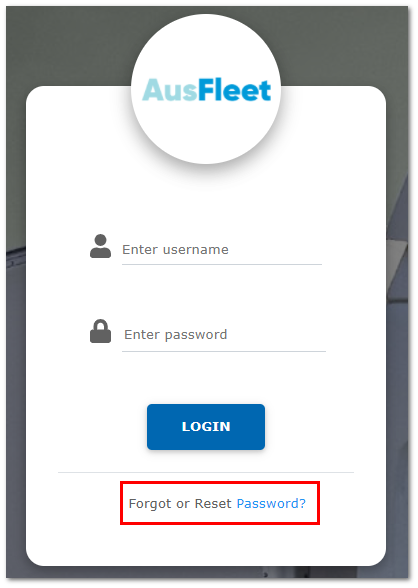
Click on "Forgot or Reset Password "
|
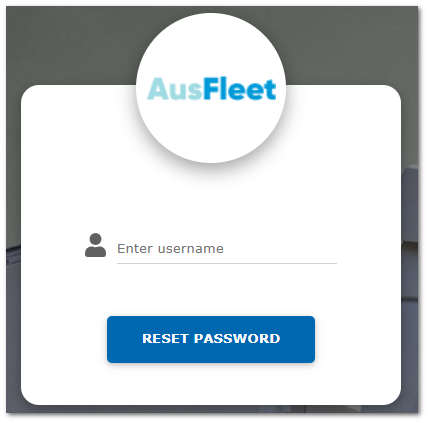
Confirm your username.
If your username is not recognised or an email address is not found, it is not recorded in AusFleet.
Contact your Fleet Department for assistance.
|
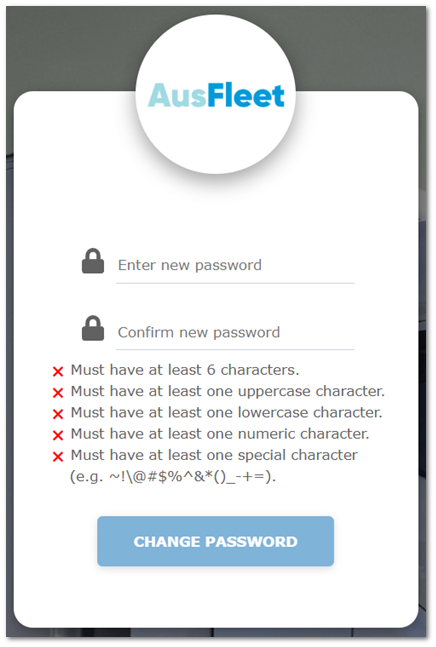
Click the link on the email you receive to set a new password.
The username is not case sensitive.
|
|
|
|
|
2. How Do Administrators Reset Passwords for Other People?
Personnel>>Details
Click on the link in the "Username" field to rest the password for that person.
|

