|
1. Inactive/Discontinued Parts
Parts cannot be deleted.
When a part is no longer used, make it "Inactive" by changing the status in the parts details tab.
Inactive parts are hidden from normal view and cannot be selected for purchase orders, issues etc.
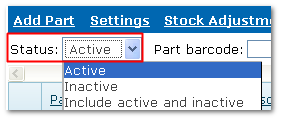
View inactive parts using the "Status" filter on the Inventory menu.
Status Filter: Show active, inactive or both
End of chapter.
|

