|
1. How do Hire charges work?
Hire Profiles
Hire booking charges are applied as set in a "Hire Profile", created in More>>Reference Files>>Hire>>Profiles
A Hire Profile consists of:
•Charges that apply to every booking (e.g. by km, hour etc).
•The asset's availability times E.g. 24/7, weekdays only, 9am to 5pm.
•The days/times when charges apply during the booking e.g. 24/7, 9am-5pm Monday-Friday.
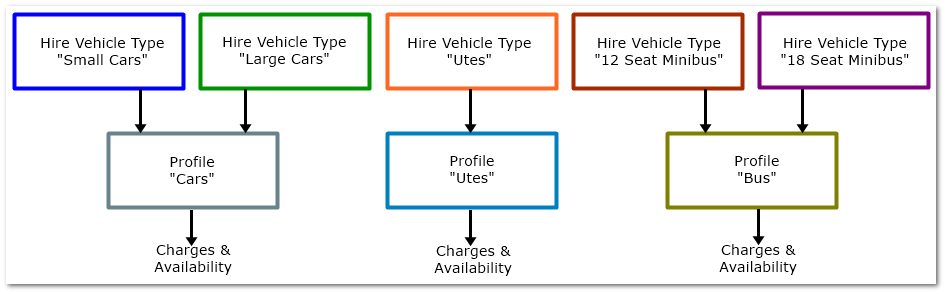
Profiles are attached to "Hire Vehicle Types"; these describe the types of assets for people making bookings.
|
Linking Profiles and Hire Vehicle Types
Booking Search

|
Hire Vehicle Types
•A Hire Vehicle Type must be assigned to every item available for hire (Fleet>>MMSB Categories and Flags>>MMSB).
•Hire Vehicle Type names should reflect driver search terms E.g. small car, ute, bus, plant.
•When an asset is assigned a Hire Vehicle Type, the attached Profile is applied automatically (see diagram) but it can be changed for specific assets if necessary. This allows a unique profile to be used for a specific asset while reducing data entry overall
|
Why are Profiles and Hire Vehicle Types Used?
The benefits of this method include:
•Users filter searches using easily understood names to only see suitable assets E.g. Ute, Bus, Small Car
•Less data entry - charges do not have to be set for individual assets
•Changing a Profile automatically updates all items using that Profile (existing bookings are not changed, avoiding price changes for current bookings)
|
See also: Hire Booking Module Set Up
2. Why is a hire item not appearing in the list for hire?
Check the following:
•Is the Hire flag ticked?
•Is the same hire pool assigned to the user and the vehicle?
•Is the item disposed?
•Is the list filtered?
•Is the asset and it's Profile only for Open Ended Bookings?
3. When I try to change my hire booking it says "Please check for availability".
•Hire items may not be available at all times and/or on all days - this is determined by the availability times in the Hire Profile (Fleet>>MMSB Categories and Flags>>MMSB)
•Profiles are configured in Hire Reference Files (More>>Reference Files>>Hire>>Profiles)
•An item may also be unavailable at a specific time due to maintenance or accident. AusFleet allows Accidents and R&M modules to be linked to Hire to prevent booking of unavailable assets
•Double bookings/overlaps are not allowed
4. Why can't I change a hire booking in the calendar? The message says "Check booking status".
•Only Bookings with status "Booked" can be edited.
•Any that are "Pending" (awaiting manager approval), "Active" (current, past start date/time) or Closed (past the end date/time, vehicle returned) )cannot be modified.
•When a "Pending" booking is approved the status will change to "Booked" and the changes can be made (subject to availability etc).
•Check the hire transactions list to see the status and approve is necessary.
|

