|
1. What is a Domain in AusFleet?
In AusFleet, a Domain represents a physical location and is the highest level categorisation in AusFleet, separating assets, people, jobs and inventory stock into groups together.
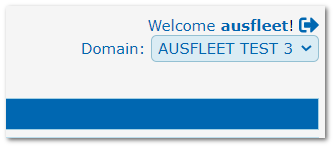
If multiple Domains are used, they can be seen in the menu at the top right of the screen, under the username and log out icon.
The Domain shown is the "Active" Domain.
Domain menu
Domains are created in the reference file at More>>Reference Files>>Administration>>Domains.
2. What Do Domains Apply To?
Module
|
Result
|
|
Fleet
|
•Each asset is assigned to a Domain when adding it to the database
•Only assets in the active Domain can be viewed
|
|
R&M
|
•When adding a job, only assets in the active Domain can be selected
|
|
Personnel
|
•People can be assigned access to specific Domain in the Personnel module
•They only have access to their assigned Domains
|
|
Inventory
|
•Parts allocated to the active Domain when added to the database
•POs, GRs and quantities (issues/receipts/available/order/back orders etc) are per Domain, based on the active Domain when records are created
•Cost Price is calculated based on all Domains so the organisation has as single cost price for each part regardless of how many Domains are used
|
Example:
|
Action
|
Result
|
|
1. Create a PO for 20 items in Domain 1
|
On Order Quantity increases by 20 in Domain 1
|
|
2. Create a corresponding GR
|
Available quantity increases by 20 in Domain 1
|
|
3. Issue parts to a job where the asset is in Domain 1
|
Issue quantity increases by 1 in Domain 1
Available quantity decreases by 1 in Domain 1
|
|
4. Issue parts to a job where the asset is in Domain 2
|
Available and issue quantity changes in Domain2
No effect on Domain 1
|
3. Why Use Domains?
They are primarily designed for managing Parts Inventory, so organisations with multiple stores/workshops can manage parts effectively.
The first question in deciding whether to use multiple Domains is "Do I have separate stores where I need to manage parts individually?
If no, Domains are probably not required. See section 6 below.
If you do choose to use multiple Domains, bear in mind that when doing a R&M job on an asset belonging to a Domain, the parts used will be deducted from the quantity in that Domain.
4. What is "All Domains"?
If you choose "All Domains" in the Domain menu, you get a consolidated view of your assets, parts etc.
However, you will not be able to create most types of transactions in this mode, because AusFleet does not know which Domain to apply the transaction to.
5. The Effect of Using Domains
•AusFleet users only have access to Domains they are assigned in Personnel
•When ordering/receiving/issuing parts, the related quantity is updated in the applicable Domain
•When creating a PO for parts, an active Domain must be selected
•You will only see records related to the active Domain, unless you choose "All Domains"
•When adding parts to a job, the quantity will be deducted from the Domain to which the asset is allocated
6. When Not to use Domains and the Alternatives
•It is bad practice to use Domains to separate assets based on business units or similar.
Use the Department Hierarchy and Debtors for this. This also ensures costs are allocated correctly and invoices can be created.
Even if you do not currently use cost accruals and invoicing, correct system use now will help to future proof your database if your business requirements change later.
•Do not use them solely to control users access
Apply User Rights to limit access to certain functions, modules and transactions (More>>User Rights).
For pool (hire) vehicles, "Pools" are ideal to separate assets into groups, accessible by Pool Administrators and Drivers that share the same Pool.
•It is bad practice to use Domains to separate assets based on asset type or location
There are many ways to classify your fleet for different purposes:
•Fleet Type
•Vehicle Type
•Fleet category
•Replacement Type
•Make Model Series
•Body Type
•Charge Centre
•Hire Vehicle Type etc.
•Location
•Depot
•Allocated Driver
•Inventory Category
•Inventory Location
7. What if I am Not Sure Whether to Use Domains?
Ask your Account Manager for guidance prior to proceeding. They will be happy to advise.
|

