|
1. Updating Odometer Readings After Posting
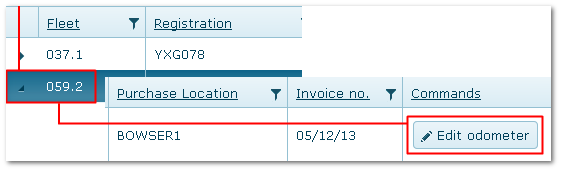
Transactions>>Fuel>>Fuel Activity
This allows corrections to be made where an error is identified later, e.g. when subsequent transactions fail validation due to a bad fuel odometer.
1.Locate the asset and transaction (see 2 above).
2.Click the "Edit Odometer" button at the end of the row.
3.If the edited record is the latest transaction for the fleet item, the odometer summary in fleet module and utilisation calculations updated accordingly.
Warning: This feature overrides all validations and no checks will be made on the reading entered. Bad readings affect utilisation, scheduling and future transaction entries.
Fuel Activity Tab - Editing Odometer
|

