|
1. Entering Renewals Manually
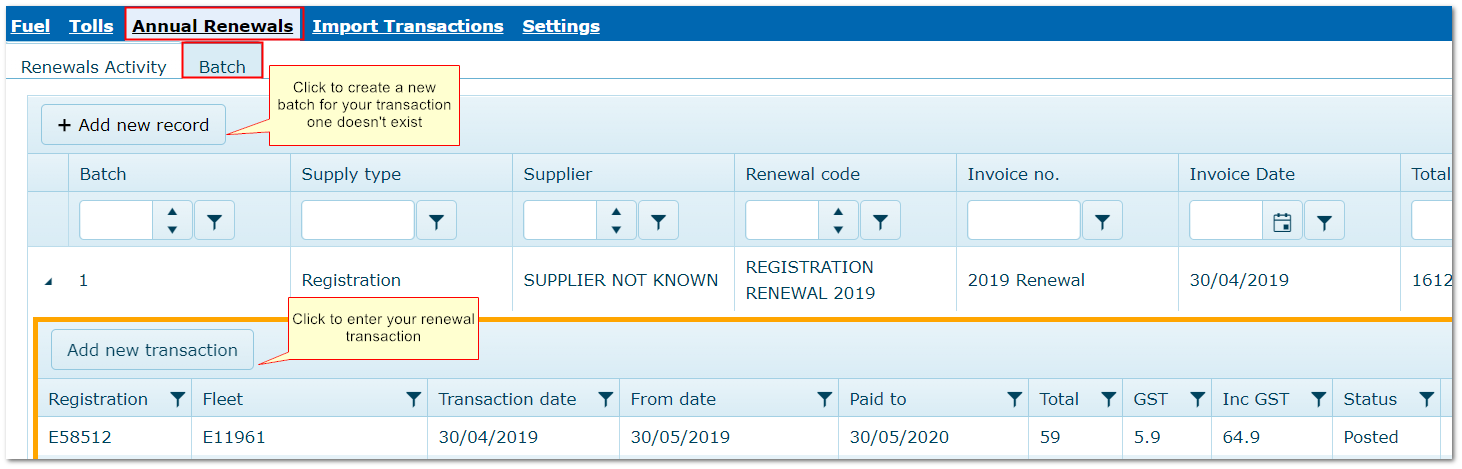
Transactions>>Annual Renewals>>Batch
Manual transactions are added to an existing batch.
If you do not have a suitable batch, create a new one by clicking "Add new record".
•Locate and open a batch with the same Supply Type, Supplier and Renewal code
•Click "Add new transaction", enter details and Save
•Post the record on the batch and if it is suspended, amend details and repost
Click "Add new record", enter details and save.
2.1 Alternative Method
An alternative method for simple recording of start/end dates per fleet item is in Fleet>>Annual Renewals tab.
This alternative does not include transaction costs.
Entering a Transaction Manually
|

