|
From Version 9.3 the following import process has been replaced by an updated import module and will be removed during 2023/4.
New File Import Programs.
1. Renewal Import File Format
Transactions>>Import Transactions>>Annual Renewals
•Each file to be imported must contain only one renewal type E.g. Insurance
•The file format must not be changed
•The header must be retained and not changed
•The file must be a .csv. (csv = comma separated values). These files can be opened and edited in Excel but must be saved as .csv.
Data that can be imported:
Registration
|
Transaction Date
|
Start Date
|
Expiry Date
|
Cost
|
|
Alpha Numeric
|
DD/MM/YYYY
|
DD/MM/YYYY
|
DD/MM/YYYY
|
Number with 2 decimals and no $ symbol
|
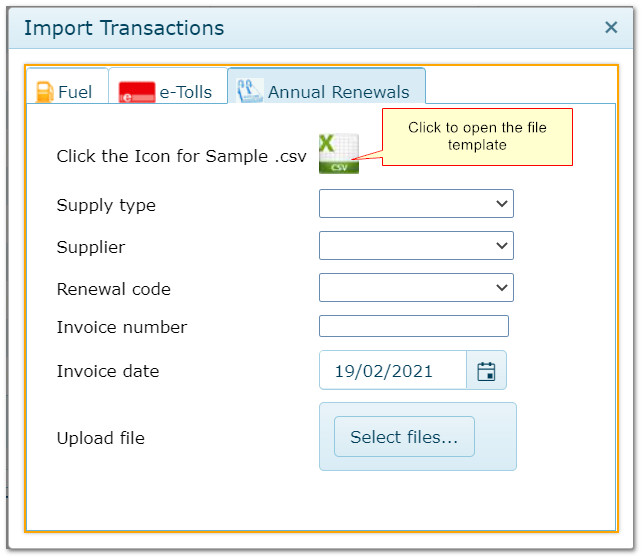
Import transactions screen
2. Import Process
•Populate the csv file with all your renewals, following the rules above
•Complete the fields in the window above
•Click "Select Files" and locate the file or drag it into the window
•Click "Upload files" when the button appears
•Transactions will be scanned, validated and then posted or suspended automatically
A results summary appears on completion.
Review results in Transactions>>Annual Renewals>>Batch
Correct any suspended files, amend the records and re-post.
3 Validations
When importing, each record is checked for the following conditions before being posted.
Records which fail any ofn teh checks below are suspended.
Registration
|
Is registration included in file?
|
Fleet item exists
|
Is registration in AusFleet database?
|
Start and end date
|
Is the renewal date range included in file?
|
Cost
|
Is the cost zero or missing in file?
|
Duplicate transaction
|
Is there an existing transaction of the same renewal type with an expiry date equal or later than the new one?
|
Transaction Prior to Expiry
|
Is the transaction date less than or equal to the current "Paid To" date in AusFleet?
|
|

