|
See also:
Suppliers Set Up
Debtors Set Up
Each module chapter includes related reference files in its Set Up page.
1. What are Reference Files?
Reference files provide the underlying data on which the system operates.
They are located at More>>Reference Files.
Access to reference files should be restricted via user rights to avoid errors and duplication.
Reference files populate menus throughout AusFleet and also organise relationships and hierarchies
E.g.
Make - Model - Series
Department - Branch - Region
Debtor - Debtor Type
Using Reference Files rather than allowing users to type into the database ensures data integrity and accuracy is maintained and reporting is more meaningful.
Many default reference files are provided during deployment if AusFleet imports the initial dataset.
From then, they have to be maintained as required E.g. Adding new vehicle types.
It is vital they are set up accurately to reflect:
•User requirements
•Real situations
•Reporting requirements
"Not Applicable" is often a useful option in reference files.
For more complex reference files, additional information is provided in the individual Module chapters
2. Types of Reference Files
•Many references are simple e.g. a description and suppressed flag. These are intuitive to maintain
•Others are more complex, containing hierarchies similar to a family tree which reduce the options when populating related fields (e.g. department hierarchy)
•Some may also contain extended information related to the basic description e.g. fuel type, which relates the fuel type to costs, CO2 emissions, equivalent fuels etc.
More complex reference files are explained in each of the Module chapters.
3. Creating Reference Files
•Navigate the the required reference file.
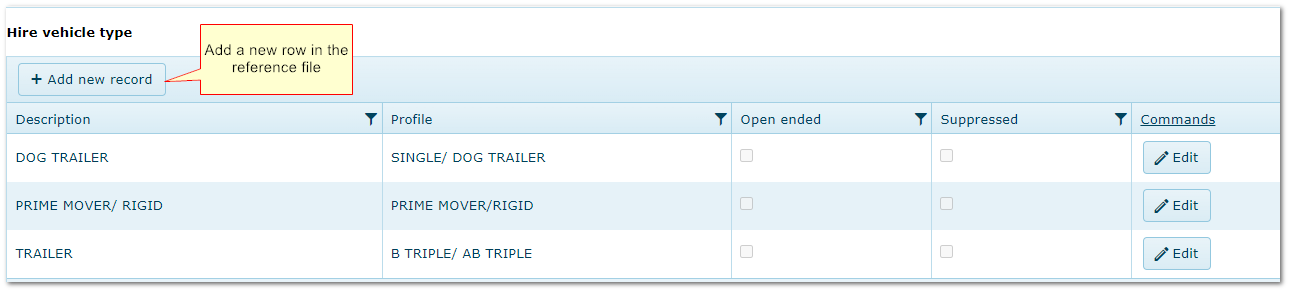
•Use "Add new record" button to create a new reference
•More complex references e.g. Fuel need additional information adding.
"Add New" button in "Hire Vehicle Type" Reference File
4. Removing/Suppressing Old Reference Files
•Reference files cannot be deleted as this would corrupt the database. However, they can be "Suppressed" if no longer required
•Each reference has a Suppressed flag which acts to hide the item from any menus without affecting historical records
•To show only active or only suppressed rows, use the funnel filter
Suppressed flag in "Hire Vehicle Type" Reference File
.png)
5. Editing References
•Updating an existing reference will apply the change to all instances where the reference has been used.
•Use the "Edit" button to change details and correct errors.
•More complex references e.g. Suppliers, have connected information which can also be edited. There may be a separate button to change this underlying data.
•For references which include cost information E.g. Bulk Fuel Charges ($/litre), updates are made by entering an Effective Date when the new rate applies
Edit Button in "Hire Vehicle Type" Reference File
.png)
|

