|
1. What Are Parameters?
Parameters, or Settings, are used to:
•Control the way certain functionalities works ("Flags & Settings").
•Populate data automatically based on defaults values ("Default Values").
•Configure AusFleet to operate in different ways to suit different requirements.
They affect all users and are located at More>>Parameters.
It is strongly recommended that parameters are set before starting to use AusFleet and then adapted over time if your requirements change.
This ensures an initial understanding of available settings a more efficient system from the start.
Parameter set up is usually included in AusFleet's deployment services as a joint activity.
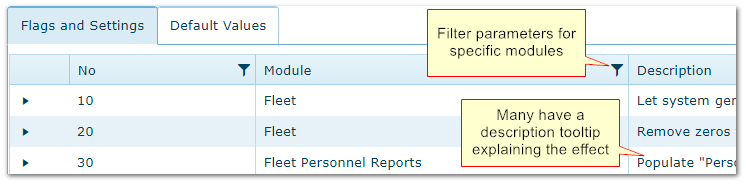
•Use the funnel filter on the column heading to display parameters relating to particular modules.
•In most cases, hovering the mouse over a description will display a tool tip with more information.
Parameters can have significant effects on how the system operates and they must be reviewed prior to using AusFleet for the first time to ensure appropriate work flow and performance.
Filtering parameters by module
2. Flags & Settings
To change a setting, open the row, click Edit and set accordingly. Then Save.
3. Default Values
•Most defaults are used to reduce data entry by populating fields when records are added (e.g. new R&M job, new inventory part)
•Default values can be changed in individual records if required
•Some defaults relate to information required for AusFleet to operate, e.g. server addresses to send automated emails
|

