|
1. Replacement Type Reference File
Reference files>>Fleet>>Fleet items>>Replacement type
Replacement Types must categorise assets with common:
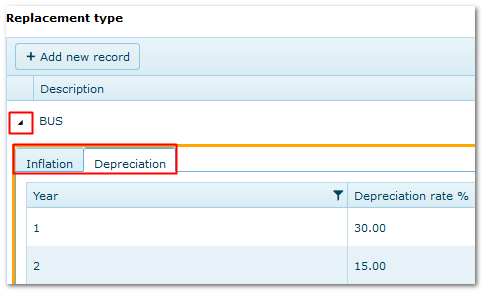
•Annual Depreciation rates (i.e. decrease is disposal values)
•Annual Inflation rates (i.e. increase in replacement cost)
Create as many Replacement Types as needed to reflect the diversity of your fleet.
A car-only fleet may only need two or three types to cover standard, luxury and electric vehicles, whereas diverse fleets may require more to reflect differences in plant, equipment and light fleet.
•Describe the category
•Enter the annual depreciation and inflation %'s
When entering %'s, only the number of years covering the maximum expected life of assets is required*. E.g. if assets are replaced every 5 years, only the %'s for years 1-5 are needed.
*It is worthwhile adding some extra years in case assets life cycle extends beyond the norm or replacement policy changes.
1.1 How Depreciation and Inflation Rates are Applied
Annual depreciation and inflation %'s are applied to previous years result.
|
Purchase price =$10,000
|
|
Year 1
|
Depreciation rate: 30%
|
$10,000 -30%
|
Written down value = $7,000
|
|
Year 2
|
Depreciation rate: 20%
|
$7,000 - 20%
|
Written down value = $5,600
|
|
Year 3
|
Depreciation rate: 10%
|
$5,600 - 10%
|
Written down value = $5,040
|
|
Inflation is applied in the same way.
|
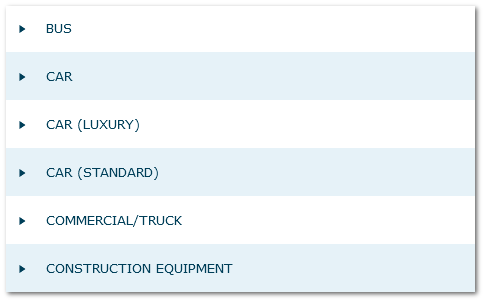
1.2 Examples of Replacement Type Categories
|
Examples of Replacement Type Categories
|
|
Inflation/Depreciation Tabs
|
1.3 Replacement Type Groups
When creating Replacement Types in the reference file, they can be assigned to a "Group".
Then, when generating forecasts, these groups can be selected to speed up the process and avoid having to select replacement types individually.
This is purely optional and is most useful when there are many different Replacement Types.
Example:
Replacement Type
|
Replacement Group
|
|
Cars - Small
|
"Cars"
|
|
Cars - Standard
|
|
Cars - Luxury
|
|
Plant - Small
|
"Plant"
|
|
Plant - Large
|
2. Essential Fleet Information
The following information must be completed in Fleet module to generate forecasts:
|
Delivery Date and Delivery km
|
Fleet>>MMSB, Categories & Flags
|
|
Retirement Method: Age/Utilisation/Both (whichever occurs first)
|
|
Expected Life (months and/or km/hours)
|
|
Replacement Type
|
|
Purchase Price
|
3. Parameters
There are no parameters related to Replacement Budget Forecast module
|

