|
1. Reference Files
There are no specific reference files for this module but related references are required.
1.1 Debtors
More>>Reference files>>Debtors>>Debtors
•A Debtor can be attached to each Department Hierarchy
•Assets are assigned a Debtor via its assigned department hierarchy
•The Debtor then receives any invoices that may be generated.
There is an option to assign multiple debtors to an asset. In this case, each cost is split between the debtors based on the % set in the fleet details.
When using multiple debtors for an asset, AusFleet ignores debtors in the the department hierarchy.
For more information on Debtors see: Debtors
For more information on Multiple Debtors see: Multiple Debtors.
1.2 Transaction Types
More>>Reference files>>Debtors>>Transaction Types
Each expense created in AusFleet is assigned to a "transaction type", for reporting and analysis. E.g. Fuel, R&M Parts, R&M Labour, Renewals - Registration.
Invoices can be generated based on transaction types. For example, you may choose to invoice debtors for parts costs but not labour costs.
Some transaction types are system controlled and cannot be deleted or edited. Others may be created to suit your organisations requirements.
You must tick the types that you intend to invoice. Not ticking those that will never be invoiced avoids them appearing in Invoicing module.
.png)
For more information see: Transaction Types
1.3 General Expense Types
More>>Reference files>>General Expenses>>Expense Types
These operate in the same way as Transaction Types above, but relate only to expenses entered in the optional General Expense module, if licensed.
When entering a general expense, you choose how to categorise by selecting the appropriate Expense Type.
For more information see: General Expense Types
1.4 GST
More>>Reference files>>Administration>>Company Details>>GST Set Up
You must enter the current GST rate if you want to apply GST to invoices and also to automatically calculate GST when entering expenses.
For more information see: Company Details - GST
1.5 Financial Periods
More>>Reference files>>Administration>>Company Details>>Periods
When a transaction is created, AusFleet assigns it to a financial period based on the transaction date.
This helps to align records with accounting systems, particularly where a financial interface is used.
When no more periods exist, AusFleet will automatically create a new one.
If a transaction is created after the period is closed, it is assigned to the next available open period.
Financial periods should be closed once invoicing is complete.
For more information see Financial Periods
2. Parameters
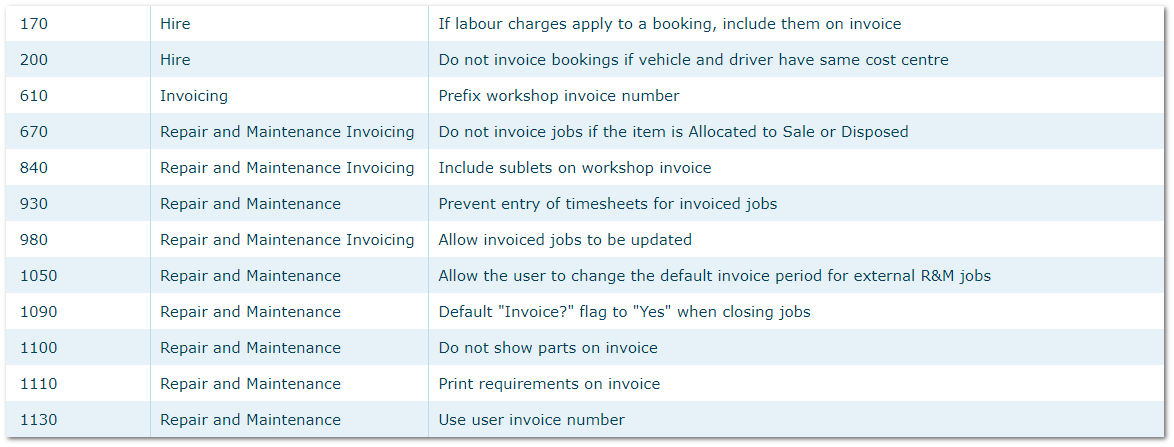
More>>Parameters>>Flags & Settings
Each of these settings has a tool tip describing their effect.
3. User Rights
More>>User Rights
User Rights 90-90.05 control access and use of the module.
4. Templates
More>>Templates
•R&M Invoice. This is used when invoicing R&M jobs directly from the R&M module
•Booking Invoice. This is used when invoicing Hire Bookings directly from the Hire module
•Invoice Email
|

