|
1. Purchase Units
Inventory>>Parts List>>Part Details
Use this function to manage quantities for parts ordered in bulk units E.g. boxes, pallets, drums
AusFleet always issues parts singly ("Each") and this function controls the order/issue ratios to make sure stock quantities and orders are correct E.g. Oil ordered by the drum and issued by the litre.
Initially, you must create the unit descriptions in the corresponding reference file: More>>Reference Files>>Inventory>>Purchase Units E.g. drum, box, pallet, pair
Then:
1.
|
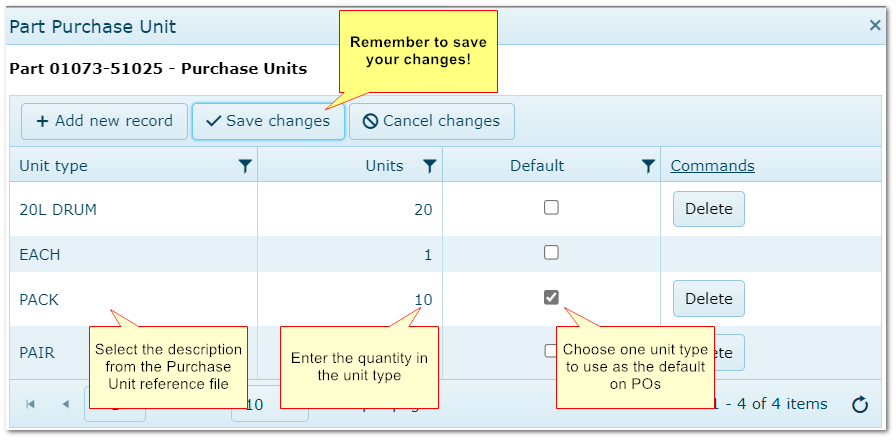
Click the "Purchase Unit" link in the part's details (highlighted in blue), choose the description and enter the quantity
|
2.
|
Descriptions can be used more than once for the same item if the quantity in each is different E.g. Box: 10 and Box: 12
|
3.
|
Tick one ratio as the default. This will be used on POs by default but can be changed
|
4.
|
"Each" is a system requirement and cannot be changed or deleted.
|
5.
|
AusFleet then maintains the correct quantities and pricing based on the ratio and applies the details to each purchase order raised.
|
Note: a unit type cannot be deleted if there is an active order or back order using it.
Entering Purchase Units
End of chapter.
|

