|
1. Introduction - Sending Job Details to Depot Staff
AusFleet includes the ability to:
•Give depot staff access to a simple job list to see jobs to be completed
•Email related job cards to the depots and other people directly from the job list.
User right 50.85 gives depot staff access to the simple job list.
Process overview:
1.Administrator creates jobs as usual and allocates them to depot(s) in the job details
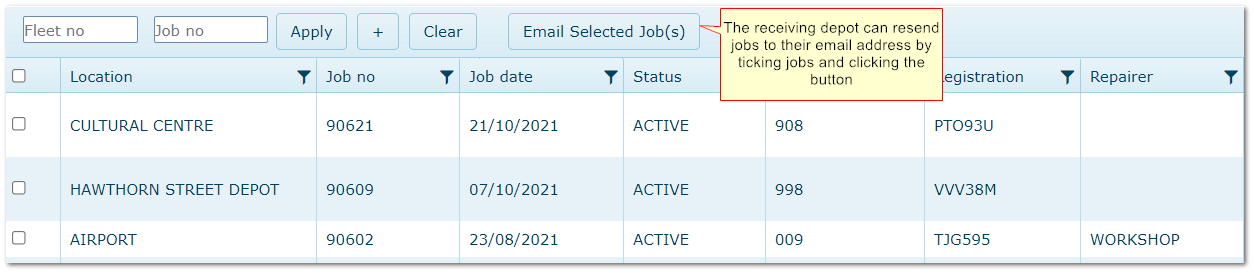
2.Depot staff with User Right 50.85 view active and pending jobs allocated to their depot in a simple jobs list
3.Administrator ticks Pending/Active jobs and emails the job cards to the depot(s) - jobs are date-stamped when emailed and Audit is updated
4.Depot staff retrieve job cards via email and can resend job cards to their depot email address if necessary
5.When jobs are closed they disappear from the depot view
Depot staff only see jobs that are assigned to their depot I.e. the Depot in the Job Details matches one of the Depots assigned to the user in Personnel.
2. Set Up
|
1. Enter email addresses for depots
|
More>>Reference Files>>Repair & Maintenance>>Depots
|
These are the email addresses job cards will be sent to
|
|
2. Assign Depots to depot staff
|
Personnel>>Depots tab
|
Assign the Depot(s) that each person works in
|
|
3. Assign Domains to depot staff
|
Personnel>>Domains tab
|
Assign the Domain(s) that users need access to
|
|
4. Assign User Right 50.85 to depot staff
|
More>>User Rights>>Users
|
Locate each user and assign 50.85*
|
* This is a non-licensed user right i.e. users with only this user right do not count towards your licensed user count.
3. Using the Function
|
1. Create jobs as normal using any method E.g. from services due, checklists, service requests or add manually
|
|
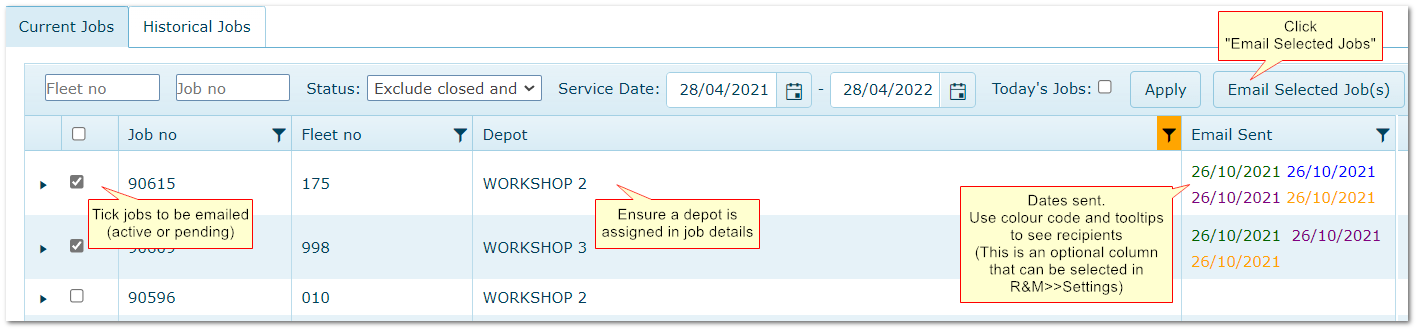
2. Make sure a Depot is assigned in the the job details
|
|
3. Tick the jobs to be emailed in the job list (only active or pending status)
|
|
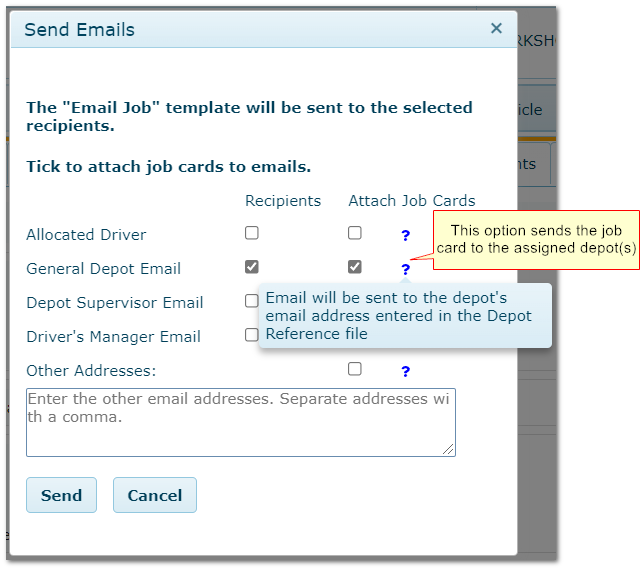
4. Click "Email Selected Jobs" and choose "General Depot Email" and "Attach Job Cards" - see below.
|
4. Screenshots
4.1 Depot Field in Internal Jobs

4.2 Depot Field in External Jobs

4.3 Emailing Jobs
4.4 Send Emails Pop Up
4.5 Restricted Depot Job List
|

