|
1. Introduction
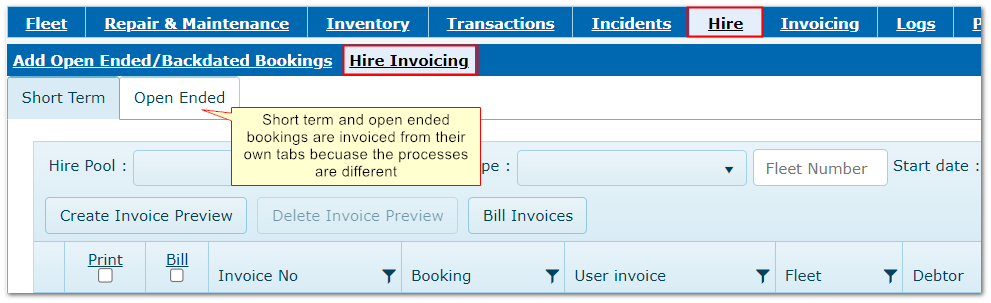
Hire bookings can be invoiced from within the Hire module.
Short term and open ended bookings are invoiced in different tabs due to different processing requirements.
Invoice details not not appear in Invoicing module (if installed) if invoiced in the Hire module.
Hire Invoicing
2. Hire Invoicing Parameters
More>>Parameters>>Flags and Settings
There are four parameters that have important effects on hire invoicing:
170
|
Choose whether to include labour charges on invoices if timesheets are entered in a booking
|
200
|
Choose whether to stop bookings being invoiced if the driver and asset have the same cost centre
|
380
|
Makes Debtor mandatory on bookings. Without a Debtor, the booking cannot be invoiced
|
390
|
Choose whether to invoice to the Debtor attached to the asset or the driver. This takes effect when making the booking
|
3. Invoicing Short Term Bookings
3.1 Generating an Invoice Preview
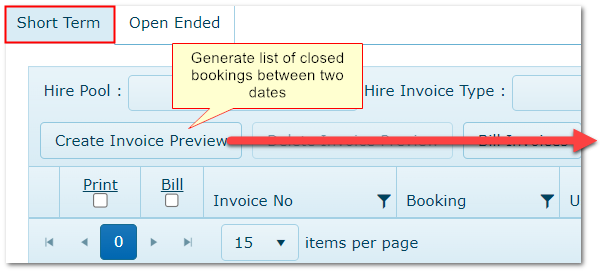
Initially the grid is empty until an invoice preview is generated.
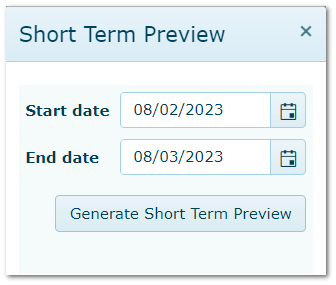
This is a list of closed bookings, not yet invoiced, between two dates, based on booking start date.
The preview is retained until logging out of AusFleet.
Deleting Preview: Use the Delete Invoice Preview button. This does not delete booking records, just the current view, which can then be regenerated as required.
Generating an Hire Invoice Preview
3.2 Invoice Preview Options

3.3 Viewing Invoiced Bookings
After invoicing, the records are removed from the preview list. Invoiced bookings can be seen using the "Invoiced" flag in the filter bar.

4. Invoicing Open Ended Bookings
4.1 Business Rules
An invoice will be created for each calendar month, or part thereof, that the booking remains open, based on the monthly hire charge in Fleet>>MMSB, Categories and Flags.
•When a job number is assigned to the booking
The invoice will be created for the debtor in the job.
•When a job number IS NOT assigned to the booking
The invoice will be created for the debtor in the booking detail screen.
•When there is no job no or debtor assigned to the booking
A message will advise that the booking cannot be invoiced
•If a booking ends before the month end
Charges will be pro rata'd based on the number of days.
•If a booking starts mid-month
The first month is charged in full, regardless of start date.
4.2 Invoice Generation
The process and options are the same as for short term bookings (above), except that:
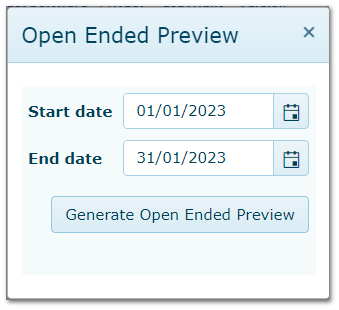
•When generating the invoice preview, dates cannot be changed and will default to the oldest month that has not yet been invoiced. Each month must be invoiced in turn
•A "Close Period" button is available. This sets the "Closed" and "Archived" flags ON in the Period Reference file
•Once a period is closed, further Open Ended Bookings cannot be invoiced for that period
•Invoiced bookings in closed periods can be viewed using the "Invoice Period" menu
|
Generating Preview - Dates Are Fixed
|
Close Period button
|
Viewing Closed Invoiced Periods

|
|

