|
1. Introduction
Before use, please review the module Set Up details.
Tolls consists of two main elements:
•Tag allocation to vehicles.
•Importing/adding toll transactions.
Basic Rules:
•A Tag cannot be allocated to two vehicles at the same time - unallocate then reallocate
•Toll records in Fleet>>Ownership & Allocation, Tolls module and the Toll icon are all connected and updating in one area updates all others
•Toll expenses accrue to the vehicle's debtor when posted
1.1 To See Unallocated Tags
Transactions>>Tolls>>Tag Allocation
See the "Allocated" column.
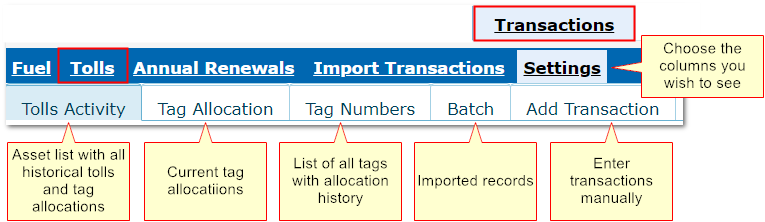
1.2 To Choose Which Columns to Display in the Main Toll Window
Transactions>>Settings>>ETags
Tick the columns to view. Around 10 columns are recommended for best display and performance.
If the import process fails it is usually because the supplier has changed the file format. Contact Ausfleet Help Desk on 02 9986 2800.
2. Tolls Menu
Transactions>>Tolls
3. Table of Contents
Add new tag
Add transaction manually
Allocate/Unallocate Tags
Deactivate tags
Import toll files
Tag Allocation History
|

