|
1. Reference Files
1.1 More>>Reference Files>>FBT
To/From date ensure the correct values are applied automatically.
When published rates change, add a new line with relevant To/From dates rather than editing existing values.
Rates are published by the ATO.
Reference Name
|
Examples
|
Deemed Depreciation
Determines the depreciation of the vehicle and non-business accessories when using the Operating Cost method
|

|
FBT Tax Rates
Used to calculate the tax liability from the grossed up taxable value
|

|
Gross Up Factor
Used to convert the taxable value to the grossed up taxable value
Type 1: Use if a GST credit is available, Type 2: Use if no GST credit is available
|

|
Statutory Fraction
For determining the vehicle's taxable value
|

|
Statutory Interest Rates
Determines the interest to be included when using the Operating Cost method
It replaces any actual interest occurred and also applies to non-business accessories fitted
|

|
1.2 Reference files>>Personnel>>Contribution Types
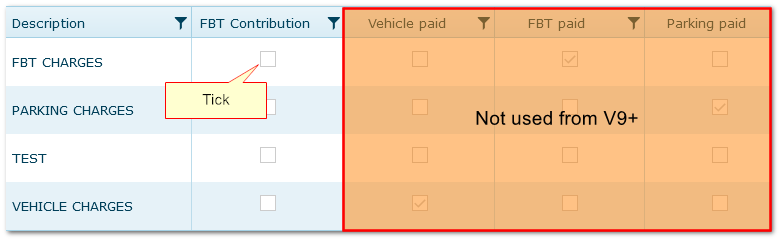
Tick the contribution types that need to be taken into account when calculating FBT.
Then, when employee contributions are entered in Fleet>>Ownership and Allocation or Personnel>>Employee Contribution (manually or via an interface), AusFleet will consider them appropriately calculating FBT.
The other flags here are not used from version 8.1 onwards.
2. Parameters
More>>Parameters>>Flags & Settings>>100
Choose whether to apply Gross Up Factor 1 or 2.
3. Other
3.1 Identify Vehicles as FBT Applicable
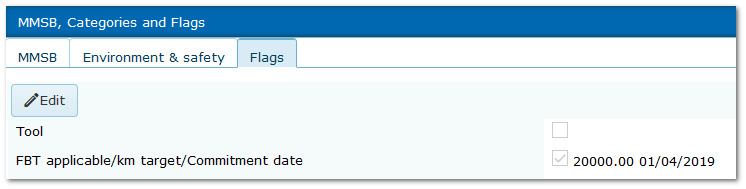
Fleet>>MMSB, Categories and Fags>>Flags
To assign assets as FBT applicable and activate FBT calculations, details must be completed appropriately in Fleet module.
km target does not affect calculations but is retained as it is still used for internal purposes by some clients.
Commitment date is essential as the date from which FBT applies.
See also:
Logs module
Logs module set up
|

