|
1. Reference Files
More>>Reference Files>>Inventory
See also: Reference Files>>Suppliers to create Inventory Suppliers for use on purchase orders etc.
Important: When creating Inventory Suppliers, make sure to tick the "Inventory" services flag for each supplier to ensure they appear for selection in Inventory module.
1.1 Inventory Category
These are used to classify parts into groups for reporting and can be created as per your organisation's requirements
Examples: Electrical, Sundry, Mechanical, Transmission, Sealants & Adhesives, Brakes, Consumables
1.2 Cost Category
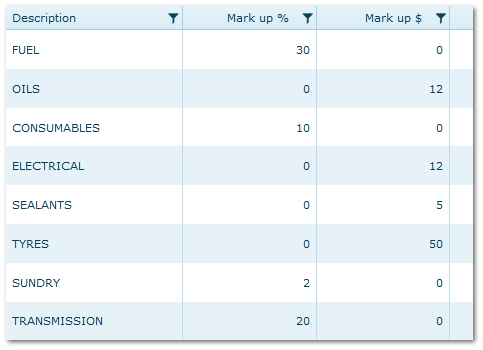
•Similar to Inventory category but includes a default mark up by either % or $
•Create categories and enter the default mark up that applies to parts in each category
•The default can be changed for individual parts in the Inventory module but having defaults can reduce data entry and user error
•Default mark-up in either % or $ but not both - mark ups are applied to the current cost price for each part
Cost Category Reference File
1.3 Inventory Locations
The physical locations within the depot in which parts are kept
Examples: Tyre bay, Store 1, Store 2, Body shop, Commissioning bay
Although a mandatory reference, your organisation may only require one default location e.g. Workshop Stores
Whether to Use Locations or Domains
•Locations are to help locate where stock is stored
•If you have different physical depots which are each managed separately for ordering etc. consider using Domains
•Domains allows each depot to see only their own parts and to make requests to other domains for parts transfers
•Seek advice from AusFleet Support prior to using Domains as they have an intrinsic and important effect on system use
1.4 Unit of Measurement
Affects only purchase quantities, not issues. All parts in AusFleet are issued singly (i.e. "Each").
Use for parts ordered in multiples/bulk quantities e.g. drums, pallets, boxes, to maintain correct order/issue quantities/price.
•Enter the names for the units e.g. box, pallet, drum
•"Each" is also required for parts ordered singly. If all parts are ordered in single units, only "Each" is required
•Each is a system reference and cannot be changed
In this reference file, you only create names for the packs. Quantities per pack are entered in Inventory module for each part
See also: Inventory Part Details
Examples:
Part
Description
|
Purchase
Unit
|
Quantity in each purchase unit
|
Issue
Unit*
|
|
Engine Oil
|
Drum
|
200
|
Each
|
|
Brake Fluid
|
Drum
|
12
|
Each
|
|
Seat Protectors
|
Box
|
100
|
Each
|
|
Tyres
|
Each
|
1
|
Each
|
|
Fuses
|
Box
|
24
|
Each
|
* Issue unit is system controlled and is always "Each"
Using this information, AusFleet calculates the correct costs and quantities for reorders.
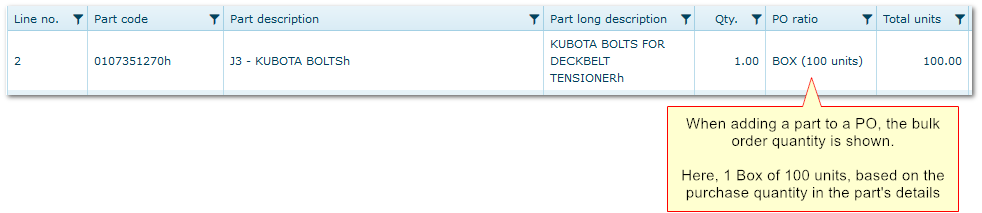
Purchase Orders show the quantities when creating orders to avoid accidental over-ordering.
2. Parameters
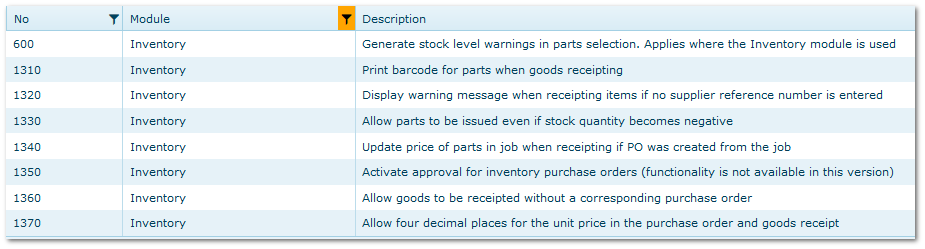
The following parameters should be reviewed and set according to preference. Each has a tool tip explaining the function.
More>>Parameters>>Flags & Settings
More>>Parameters>>Default Values
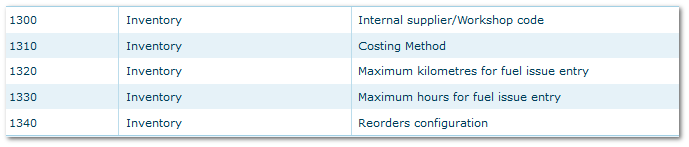
1300 - Select a supplier that represents your internal workshop for jobs completed internally.
1310 - Choose how the current cost price for parts should be calculated.
•Last Price: Price recorded on most recent Goods Receipt
•Average Price: Average of all GR prices since the part's Opening Date (i.e. date part added or last stock take date)
1320/1330 - Legacy values - not used in V8.42+
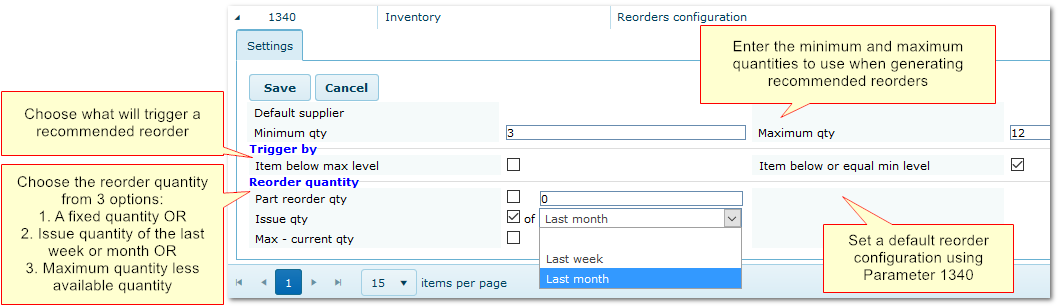
1340 - Reorder Configuration:
This sets the default trigger and order quantity for recommended reorders (Inventory>>Orders/Receipts>>Reorders)
Note that all the default settings can be changed for individual parts but having a default can reduce data entry.
Recommended Reorders Configuration
End of Chapter.
|

