|
1. Introduction
Job Import allows details of R&M jobs to be imported from csv files rather than manually adding them.
However, the data that can be imported is limited to core information that allows Service Matrix to be updated and dates and costs be be recorded.
|
Invoice No
|
|
Job Class
|
|
Job Level
|
|
Comment
|
|
Job Date (dd/mm/yyyy)
|
|
Labour EX GST
|
|
Parts EX GST
|
|
POL EX GST
|
|
Sublet EX GST
|
|
Misc EX GST
|
|
Location
|
|
Registration
|
|
Odometer
|
|
Service Provider
|
|
Kit Name
|
POL = Petrol, Oil, Lubricants
The set up requires the codes used in the supplier's data file to be mapped to Job Classes, Job Levels and Transaction Types in AusFleet.
This allows suppliers to use short codes when completing records, helping minimise mistakes, spelling errors etc.
Examples:
AusFleet Job Class
|
Suppliers' Code
|
|
Maintenance
|
M
|
AusFleet Job Level
|
Suppliers' Code
|
|
Unscheduled
|
U
|
AusFleet Transaction Type
|
Suppliers' Code
|
|
General Repairs
|
R
|
2. Reference Files
More>>Reference Files>>Job Import
2.1 Job Class Mapping
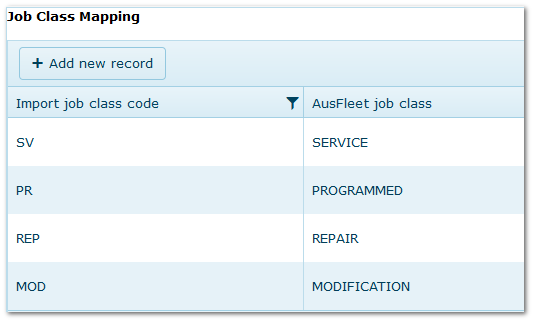
In the first column enter the codes that your suppliers will use to record Job Class for the work they carry out.
In the second columns select the corresponding AusFleet Job Class.
2.2 Job Level Mapping
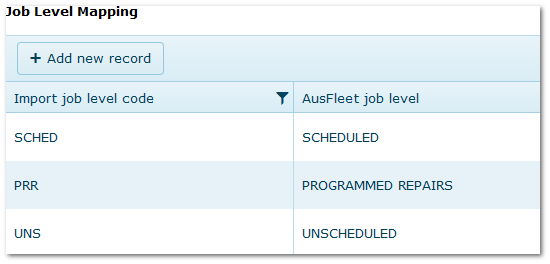
In the first column enter the codes that your suppliers will use to record Job Level for the work they carry out.
In the second columns select the corresponding AusFleet Job Level.
2.3 Transaction Type Mapping
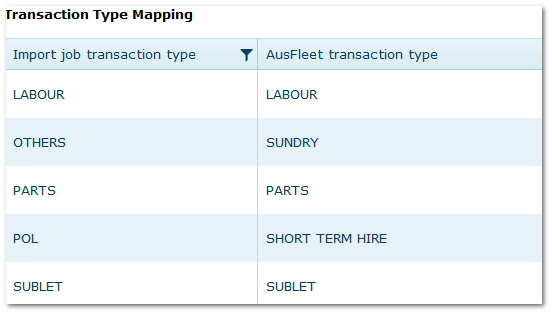
This reference is slightly different to those above.
The import routine is designed to record five different Transaction Type, as shown in column 1 below, and these cannot be changed.
The corresponding Transaction Types you wish to record them as are selected in column 2.
POL = Petrol, Oil, Lubricants
2.4 Suppliers
More>>Reference Files>>Suppliers
Ensure suppliers are created in the Supplier reference file and flagged for "Maintenance service".
3. Parameters
More>>Parameters>>Default Values>>720
Choose a Default Supplier (used when posting a record with a missing supplier)
AusFleet>>More>>Parameters>>Default Values>>570/600
Set Parameters 570 and 600 to “Service” and “Programmed” respectively so that services are correctly recognised and managed by AusFleet.
4. Standard Format Import File
The work completed must be recorded in the standard import file.
A sample of the file is available in Repair & Maintenance>>Job Import>>Create New Batch
The order of columns must not be changed.
|

