|
More>>Reference Files>>Repair & Maintenance
1. Depot
Not mandatory but recommended
•Depots are your physical, internal, workshop locations
•They are useful if you have multiple depots/workshops and need to distinguish where jobs were completed
•For each Depot, a Supervisor can be selected (Supervisors are people flagged as "Supervisor" in the Personnel module)
•When a Depot is selected in an internal job, this Supervisor will be added to the job details by default
2. Findings
Not mandatory
•Findings are entered in workshop jobs and help if investigation/approval is required prior to commencing a job
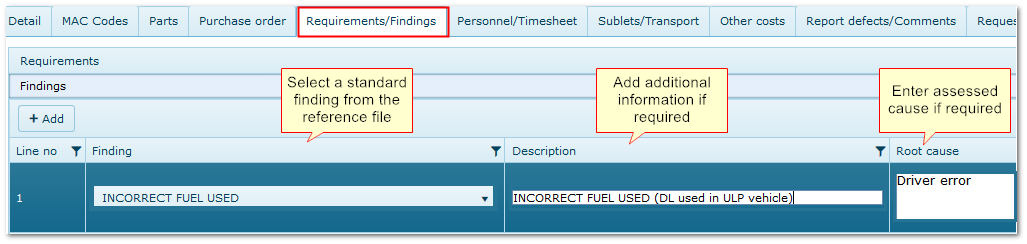
•They allow standard findings to be entered along with a free type description and root cause
•Findings may identify which component is at fault (as in the example below) or how the fault has occurred. e.g. abuse, incorrect operation, normal wear and tear etc
•The findings can then be used to determine if charges are applicable, whether the job will commence etc.
Findings in a R&M Job
3. Fixed Charges
Not a mandatory reference
"Fixed charges" are applied to EVERY internal job to cater for consumables and suchlike e.g. seat cover, cleaning materials.
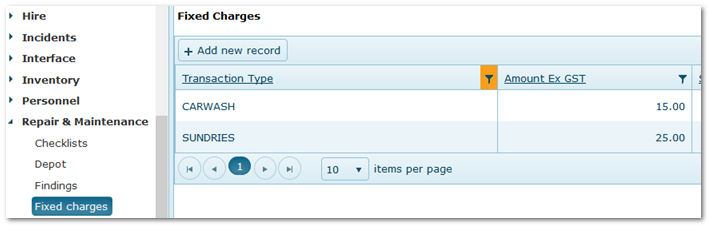
Select Transaction Type(s) and enter the related cost.
Note:
Fixed costs can also be applied via a Service Kit, when they are charged only when the Kit is used on a job.
Either or both methods may be used.
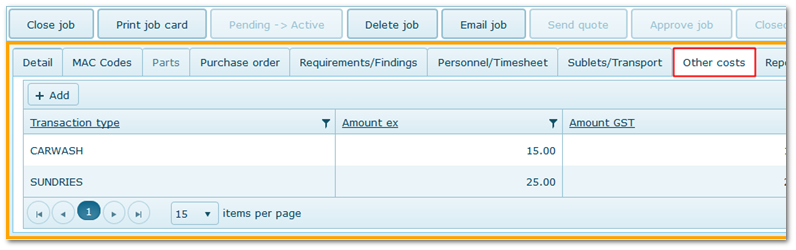
In the job, Fixed Charges appear in the "Other Costs" tab.
Fixed Charges Created in the Reference File
Fixed Charges Shown in the Job
4. Hour Types
A mandatory reference for entering timesheets
•Used in timesheets to describe the activity undertaken
•The range of Hour Types will depend on how detailed you need time to be classified
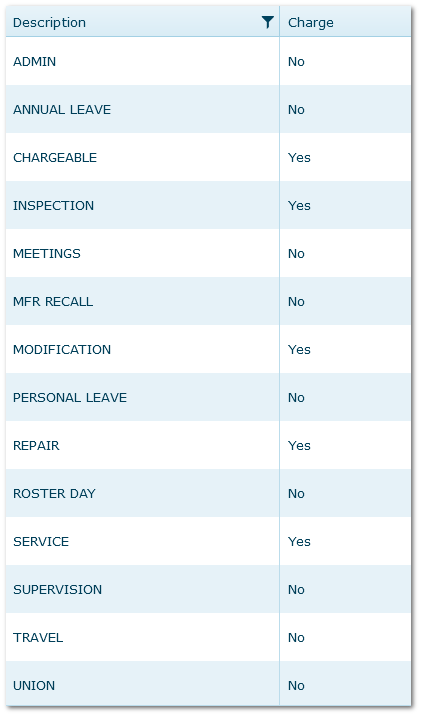
•The Hour Type can be chargeable or non chargeable. Select this in the "Charge" column
•If chargeable, the charge is added to the job as Labour Cost at either the person's charge rate in the Personnel module or the Debtor Type charge rate if applicable
•If a non-chargeable Hour Type is chosen on a timesheet, the labour charges will not be included in the R&M or Hire transaction
Note:
"Auto Labour Entry" flag is a legacy feature and can be ignored. It has been replaced by the My Job app.
Examples:
Hour Types Reference File
5. Job Class
A mandatory reference.
The main classification for the type of repair and maintenance job E.g. Service, Repair, Check, Overhaul, Inspection.
If Checklists module is used, creating a Job Class "Pre-Start Checklist" is recommended for jobs created from that module.
IMPORTANT:
•"Service" and "Programmed" job classes are used to denote service jobs and must not be changed
•If a job has Job Class "Service" or "Programmed", a Regime and Sequence are mandatory on the job to ensure service scheduling is maintained
See also: Regimes
5.1 Suggested Repairers
Optional
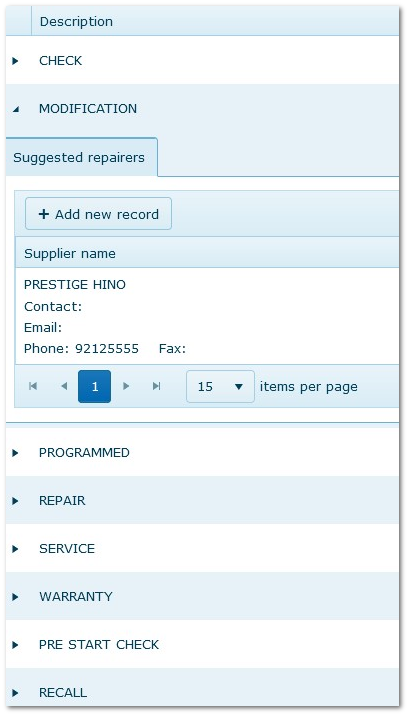
One or more repairers from the Suppliers reference file can be attached to each Job Class. One can be nominated as the default supplier for that type of work.
The default supplier is shown in EXTERNAL jobs as a suggestion as to who should carry out the job (a different repairer can be chosen).
Job Class Reference File Showing a Suggested Repairer for Modifications
6. Job Level
A mandatory reference.
•A subclass used to further describe jobs
•Job Class and Job Level must be selected in every R&M job to describe the nature of the work carried out
•"Scheduled" is an important Job Level, used to classify scheduled services
Examples:
Scheduled, Unscheduled, Ad hoc, Urgent, Abuse, Safety, Urgent, Misuse, Abnormal, Wear and Tear.
7. Mechanic Comments
Not a mandatory reference
•Allows predetermined or free type comments to be added to jobs
•To enter Comments in jobs, at least one reference must be added
•Comments appear in the Report Defect/Comments tab in jobs
If a free-type description is also entered in the job, the Comment is overwritten.
If a description is not entered in the job, the selected reference is saved as the comment
Examples:
•Additional defects found
•Subject to abuse
•Requires further investigation
•Not repairable
8. MAC Codes (Maintenance Analysis Codes)
Not a mandatory reference
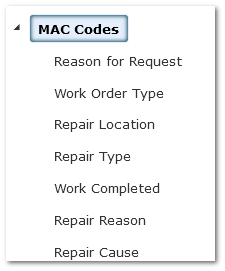
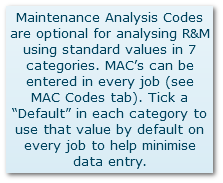
•These seven codes are used to classify R&M jobs for analysis by exporting to Excel for manipulation
•Not all codes have to be used
•A default can be chosen for each and this will populate the field in the job
•"Work Completed", "Repair Reason" and "Repair Cause" appear in AusFleet's My Job app so the mechanic can enter the appropriate codes
MAC Code Reference File
Export MAC Codes button in R&M module

9. Projects
Not a mandatory reference
Projects are a simple reference that allow a project to be selected in R&M jobs.
Examples: Road maintenance, excavation, demolition, emergency events etc.
10. Transport Vehicles
Not a mandatory reference
•These are assets used to provide transport services for internal R&M jobs e.g. Tow trucks, roadside assist vehicles, parts pick up
•Select the fleet items from your fleet list, describe its use (e.g. towing/plant transport/parts pick up) and enter its hourly charge rate
•These vehicles can then be chosen in R&M jobs where transport services are involved e.g. towing
•Charges are added to the job as "Transport" costs in the Sublets/Transport tab
Transport Services in R&M Job

11. Workgroups
An important reference if timesheets are used
Workgroups are used to classify personnel time in timesheets in terms of "type of work carried out".
Examples: Brakes, Engine, Transmission, Electrical, Hydraulics, Cleaning, Assessment, Vehicle Recovery.
The Workgroup Report can be used to review which activities account for personnel time.
|