|
Before use, please review the module Set Up details.
1. Introduction
•Fuel module allows supplier files to be imported, validated and posted.
•Purchases can also be added manually
•Up to 17 validations are carried out on every transaction. Suspended records can be amended and posted
•Consumption and costs are recorded against the asset and can be invoiced using the Invoicing module or via a financial interface
•Fuel consumption report shows actual litres/100km vs Min/Max litres/100km (Min/Max is entered in Fleet>>MMSB Categories and Flags)
•Fleet and asset dashboards provide fuel consumption statistics
2. Menu Options
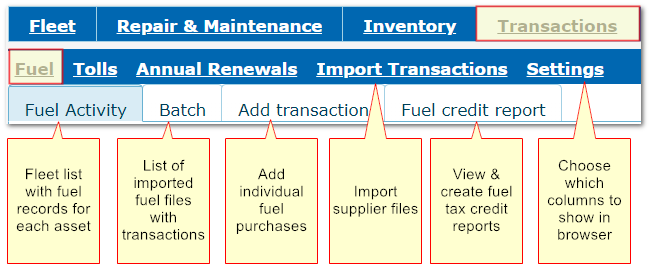
Transactions>>Fuel
Use this button on the tool bar to see more search/filter options

3. Alphabetical Index to Specific Features, Functions and Options
1.Adding purchases manually
2.Bulk Fuel Pricing e.g. Datafuel, Jigsaw
3.CO2 Emissions
4.Deleting Fuel Records
5.Equivalent Fuels
6.Force Posting
7.Fuel details in Fleet module
8.Fuel Tax Credit Report
9.Fuel Tax Credit Values
10.Fuel Tax Vehicle Type
11.Fuel Types Reference File
12.Identifiers
13.Importing supplier files
14.Parameters related to validations
15.Purchase history
16.Updating Odometers
17.Validating transactions
|

